



About
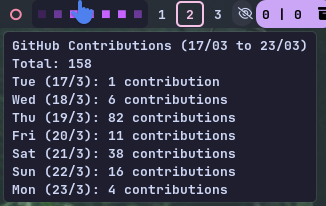
A terminal or bar integration script that fetches your GitHub contribution activity for the last 7 rolling days using the GitHub GraphQL API and renders a custom colored heatmap (■) with detailed tooltips. Designed for seamless integration with status bars like Waybar, Polybar, or any custom desktop widget.
✨ Key Features
- Real-Time Data: Pulls contribution data directly from GitHub's GraphQL API.
- Rolling 7-Day Window: Always shows the past 7 days accurately, never resetting awkwardly at the start of a week.
- Dynamic Gradients: Uses a color-coded square (■) system with automatic gradient generation based on your preferred base color.
- Custom Colors: Supports custom colors via CLI arguments in HEX or RGB formats.
- Detailed Tooltips: Hover to see a date-wise contribution breakdown, currently active base color, and total contributions over the tracked period.
🎨 Color Levels (Default Purple Theme)
By default, the script uses a purple theme. However, you can pass any custom base color (representing the highest activity level 10+), and the script will automatically calculate and generate the lower-level gradients based on that color. The default mapping is:
| Contributions | Default Hex | Meaning |
|---|---|---|
| 0 | #161b22 | No contributions |
| 1–3 | #3d2258 | Low activity |
| 4–6 | #6a3896 | Moderate activity |
| 7–9 | #974ddb | High activity |
| 10+ | #c463ff | Very high activity |
🛠️ Setup & Installation
1. Clone the Repository
git clone https://github.com/ahmed-x86/waybar-github-rolling-contributions.git
cd waybar-github-rolling-contributions
2. GitHub Authentication
To make this module work, you need your GitHub username and a Fine-Grained Personal Access Token (PAT).
- Scope needed:
Repository access → All repositories - Minimum required permissions for reading contribution data.
3. Create .env File
Inside the cloned project directory, create a .env file with the following content:
GITHUB_USERNAME=your_github_username
GITHUB_PAT=ghp_yourGeneratedTokenHere
🖥️ Waybar Configuration & Custom Colors
Ensure the script is executable, then add the block below to your Waybar config.jsonc. You can customize the heatmap color by passing the -c or --color argument.
chmod +x ~/.config/waybar/scripts/weekly_commits
Example 1: Default (Purple)
"custom/gh_heatmap": {
  "exec": "sleep 1 & ~/.config/waybar/scripts/weekly_commits",
  "return-type": "json",
  "interval": 2400,
  "tooltip": true,
  "on-click": "xdg-open https://github.com/ahmed-x86",
  "on-click-right": "~/.config/waybar/scripts/weekly_commits"
}
Example 2: Custom Color using HEX (e.g., Green)
"custom/gh_heatmap": {
  "exec": "sleep 1 & ~/.config/waybar/scripts/weekly_commits --color '#00ff00'",
  "return-type": "json",
  "interval": 2400,
  "tooltip": true,
  "on-click": "xdg-open https://github.com/ahmed-x86",
  "on-click-right": "~/.config/waybar/scripts/weekly_commits"
}
Example 3: Custom Color using RGB (e.g., Orange)
"custom/gh_heatmap": {
  "exec": "sleep 1 & ~/.config/waybar/scripts/weekly_commits --color '255,165,0'",
  "return-type": "json",
  "interval": 2400,
  "tooltip": true,
  "on-click": "xdg-open https://github.com/ahmed-x86",
  "on-click-right": "~/.config/waybar/scripts/weekly_commits"
}
🎨 Styling (CSS)
Add the following styling to your Waybar style.css. It fits perfectly with dark/Catppuccin backgrounds:
#custom-gh_heatmap {
  color: #c463ff; /* Change this to match your custom base color if used */
  background: rgba(30, 30, 46, 0.89);
  border-radius: 6px;
  margin-right: 2px;
  padding: 0px 8px;
}